On Cloud API — Account Recovery
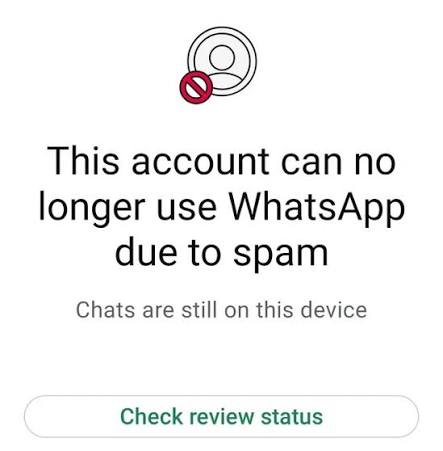
WhatsApp API Banned? How to Unban Your Number When You Are on a Tech Provider
If you are on a Tech Provider, the ban lives inside your own Meta Business Portfolio — so you file the appeal, not the provider. Stop all sending, open WhatsApp Manager → Account Quality, read the exact violation, fix the root cause, then submit one factual Request Review with opt-in evidence from Business Support Home. Restrictions usually clear in 24–72 hours; a disabled WABA takes roughly 7–14 business days.
There are already a hundred articles telling you to "contact your BSP." That advice quietly assumes something that may not be true for you: that a Business Solution Partner owns your account. If you signed up with a Tech Provider — the model On Cloud API and most modern 0% markup platforms use — the ownership is inverted, and so is the recovery process. This guide is written specifically for that case.
If you want the broader picture of why numbers get flagged in the first place, read our companion piece on why WhatsApp gets banned and how to unban it. This page is the operational one: who does what, in what order, with what wording.
First, know which kind of partner you actually have
Meta's partner ecosystem splits into Solution Partners, Tech Providers and Tech Partners, and the difference decides your entire recovery path. Solution Partners resell the full stack — messaging, billing, integration and support — and extend their own credit lines to the businesses they onboard, which is why those clients never enter a payment method themselves (Meta partner documentation). A Tech Provider builds the software and connects your own WABA, sitting under your own Business Portfolio with your own payment method.
| During a ban | Tech Provider (e.g. On Cloud API) | Solution Partner / reseller BSP |
|---|---|---|
| Who owns the WABA | You — it lives in your Business Portfolio | Often the partner, on their portfolio |
| Who clicks "Request Review" | You, as portfolio admin | The partner, on your behalf |
| Access to raw violation reason | Direct, in your own Account Quality tab | Relayed to you second-hand |
| Number portability after recovery | Number and history stay yours | May be locked to their infrastructure |
| Provider's real job | Diagnose, evidence-build, escalate, prevent | Same, plus filing |
This is the part most businesses discover at the worst possible moment. On a Tech Provider you have more control, not less — but nobody is going to click the button for you. Every hour you spend waiting for your provider to "handle it" is an hour the review clock isn't running.
One honest caveat, up front: nobody — not us, not any BSP, not any agency selling "guaranteed unban" services — can reverse a Meta decision. Only Meta can. What a competent provider does is make your appeal the kind Meta approves: correct diagnosis, real evidence, one clean submission. Anyone charging you for a guaranteed unban is selling you something they do not control.
The three levels of restriction — diagnose before you act
People use "banned" for four different states that have four different fixes. Open WhatsApp Manager and identify yours before touching anything else.
| Status | What it means | Recoverable? |
|---|---|---|
| Quality rating dropped to Red / Medium | A warning. Blocks and reports are climbing. Sending continues but throttled. | Yes — usually self-corrects when quality recovers |
| Number restricted / messaging limit reduced | Business-initiated sending is capped or paused. Inbound still works; you can reply inside open service windows. | Yes — 24–72 hours in most cases |
| WABA disabled | Whole WhatsApp Business Account flagged for a policy violation. All outbound stops. | Often — needs a formal review, roughly 7–14 business days |
| Number permanently banned | The phone number itself is removed from the platform. | Rarely. Plan for a fresh number on a clean portfolio. |
Note the asymmetry: a restricted number is an inconvenience, a disabled WABA is an outage, and a permanently banned number is a business asset gone — the number printed on your invoices, your Google Business Profile and every customer's phone. That is the real cost, and it is why prevention beats recovery by an enormous margin.
The eight steps, in order
Stop everything within the first five minutes
Pause every broadcast, campaign scheduler, CRM workflow, auto-responder and webhook-triggered send. Continuing to hit Meta's endpoints on a restricted number generates a wall of delivery errors that reads, to an automated system, as a business ignoring an enforcement action. This is the single most common way a 72-hour restriction becomes a permanent ban.
Inbound replies are fine. If a customer messages you, answer them — a healthy inbound-to-outbound ratio is one of the few signals working in your favour right now.
Read the actual violation, not your guess about it
Go to WhatsApp Manager → Account Tools → Account Quality, select the affected WABA, and open the Activity Issues section. Meta names the policy that was breached and, for API failures, gives you an error code. Write down three things: the WABA ID, the phone number in full international format, and the exact violation string.
If you are on the On Cloud API dashboard, cross-reference the same window in your own send logs. The template that fired immediately before the restriction is your prime suspect roughly nine times out of ten.
Kill the cause before you appeal
An appeal filed while the offending template is still live and scheduled will fail. Delete or pause the template. Audit every remaining template for the classic traps: promotional language sitting inside a Utility-category template, a link shortener, a CTA that promises something the landing page doesn't deliver, or a template written for a market that no longer accepts marketing sends.
Then check your list. Purchased data, scraped numbers and "we had their number from an old order" are all the same thing to Meta: sends without opt-in.
Assemble evidence before you open the form
Meta generally allows one review ticket per restriction, so the first submission has to be the complete one. Gather:
- Opt-in proof — screenshots of the checkbox, the form, the timestamped consent records in your database, or the WhatsApp inbound message where the customer started the conversation.
- Business registration documents matching the name on the portfolio (SECP certificate, trade licence, Certificate of Incorporation, Articles — whatever your jurisdiction issues).
- A live, working website that visibly matches the registered business. A parked domain or a "coming soon" page is itself a documented ban trigger.
- The corrective action you have already taken, described concretely.
File the review from Business Support Home
From the Account Quality screen, open the restricted asset, choose View details in Business Support Home, then Request Review. You will confirm identity by SMS or WhatsApp code and may be asked for photo ID. Select the appeal reason that genuinely matches — not the one that sounds most sympathetic.
Write the appeal like an incident report, not a plea
Reviewers are processing volume. Emotion, apologies and paragraphs about how important WhatsApp is to your business add length without adding signal. Three things move the needle: what happened, what you fixed, what prevents recurrence.
Template A — you accept the cause and fixed it:
Subject: Review request — WABA [WABA-ID], number [+CC-XXXXXXXXXX]

We are requesting a review of the restriction applied to the number above.

Cause identified: a marketing template ([template name]) was sent to a
segment that included contacts whose opt-in records we could not verify.

Corrective action, already completed:
1. Template [name] deleted; all scheduled campaigns cancelled.
2. Contact list re-built from verified opt-in records only
   ([N] contacts removed).
3. Double opt-in enabled at the point of capture from [date].
4. All remaining templates re-reviewed against the WhatsApp
   Business Messaging Policy; [N] re-categorised from Utility
   to Marketing.

Evidence attached: opt-in capture screenshots with timestamps,
[business registration document], website URL [https://...].

We accept responsibility for the send and have changed the process
that allowed it. We request reinstatement of messaging on this number.
Template B — you believe it is a false positive:
Subject: Review request — WABA [WABA-ID], number [+CC-XXXXXXXXXX]

We believe this restriction was applied in error and request a review.

This number is used exclusively for [order confirmations / appointment
reminders / customer support replies] to contacts who initiated contact
with us or explicitly opted in at [capture point].

Supporting facts:
- Volume over the last 30 days: [N] business-initiated conversations,
  [N] user-initiated. Ratio of inbound to outbound: [X].
- Quality rating prior to this restriction: [High/Medium], sustained
  for [N] days.
- Block rate reported in Account Quality: [X]%.
- No marketing templates have been sent from this number.

Evidence attached: opt-in records with timestamps, template list with
categories, [business registration document].

We request that the restriction be reversed.
Fill in every bracket with a real figure. Vague appeals read as guesswork; numbers read as a business that monitors its own channel.
Escalate through the Tech Provider — properly
This is where your provider earns its fee. Send us the WABA ID, the number, the violation string, a screenshot of the Account Quality screen and the timestamp of your review submission, and we work the escalation path in parallel with your ticket: log review against your send history, template category audit, and support escalation through official Meta channels where the case warrants it.
What we will not do is promise a reversal, resubmit duplicate tickets (which slows your case down), or sell you a "recovery service." Duplicate submissions are actively counterproductive — one complete ticket beats five partial ones.
Restart cold, not where you left off
Reinstatement is not permission to resume the campaign that got you restricted. Restart at low volume with your most engaged segment — recent buyers, people who messaged you in the last 30 days — using utility and service messages first. Let quality rebuild for a week before any marketing send. A number that gets restricted twice is treated very differently from one that gets restricted once.
What it actually costs you in time
| Situation | Typical resolution window |
|---|---|
| Quality-driven throttle, cause removed | 24–72 hours, often automatic |
| Number restriction, review filed | 24–72 hours |
| Disabled WABA, review filed | ~7–14 business days |
| Business verification mismatch | Depends on document turnaround, frequently the longest path |
| Permanently banned number | Plan for a new number; do not wait |
Meta publishes no guaranteed timeline, and these windows shift. Treat them as planning figures, not promises — and build the contingency now, not on day nine.
Five mistakes that convert a restriction into a permanent ban
- Registering a fresh number to continue the same campaign. Meta reads this as ban evasion and can escalate enforcement to your entire Business Portfolio. Since portfolio-level limits arrived, one bad number can drag every number you own down with it.
- Filing five tickets. Repeat submissions do not increase urgency; they extend the queue your case sits in.
- Buying an "unban service." No third party has administrative authority over Meta's enforcement. You are paying for a coin flip.
- Falling back to an unofficial bulk sender or a modified WhatsApp client while you wait. These are detected on device and behaviour patterns, and they turn a recoverable restriction into a closed case.
- Appealing without fixing anything. If the reviewer opens your account and the offending template is still active, the answer is already written.
The 2026 rules that are generating most of today's restrictions
A large share of the "we did nothing different and got flagged" cases are businesses running on 2024 assumptions. Four things changed.
Tier 0 and portfolio-level limits
Unverified business portfolios now start at 250 messages per 24 hours rather than 1,000, limits attach to the whole Business Portfolio instead of individual numbers, and Meta re-evaluates tier upgrades roughly every six hours (Chatarmin, 2026). The upside is that a new number inherits your strongest number's tier. The downside is that the blast radius of one bad number is now your entire portfolio.
Per-user frequency capping
A single WhatsApp user can receive only about two marketing template messages in 24 hours, counted across every business messaging them, and sends beyond that ceiling fail with error 131049 rather than being delivered (per-user marketing limits explainer). Your account can be perfectly healthy and still see failures because ten other brands got to that contact first. Utility, authentication and service messages are unaffected — which is the strategic point.
Template and portfolio pacing
Instead of releasing a large campaign at once, Meta holds messages past a threshold, watches how the delivered portion performs, and then either releases the remainder or pauses the template (360dialog). Pacing hits most accounts long before their tier ceiling does, and it applies especially to portfolios with under 500,000 template messages of history.
Marketing categories restricted by market
Marketing template delivery has been paused or constrained in specific markets — most notably the United States — while remaining open in others. Running one global campaign across all your markets is now a reliable way to generate failures.
Read together, these four changes point in one direction: move transactional content into Utility, keep Marketing for genuinely engaged segments, and segment by recency. That is not compliance theatre. It is the cheapest available insurance against a ban.
Market notes: what differs by country
Meta's ban rules are global. What differs is documentation, billing, number sourcing and which templates get approved. If you are onboarding or re-onboarding after a ban, these are the local details that decide how fast you get back online.
Pakistan
Business verification usually runs on SECP incorporation documents or NTN registration, and mismatches between the portfolio name and the registered name are a leading cause of stalled verification. The green tick badge was retired in July 2024 — any provider still selling you a "green tick" is quoting outdated material. Full local detail on WhatsApp Business API in Pakistan, or by city on our Pakistan city pages for Karachi, Lahore and Islamabad.
UAE and Dubai
Unofficial bulk WhatsApp tools are widely resold in the UAE through software resellers and marketing forums, and they remain the fastest route to a permanent number ban. Trade licence documentation and PDPL-aligned consent handling matter here more than most markets. See WhatsApp Business API in the UAE.
Bangladesh
Bangladesh has one of the region's fastest-growing WhatsApp commerce bases, with heavy F-commerce and cash-on-delivery order flows. That profile makes Utility templates — order confirmation, dispatch, delivery attempt, COD confirmation — the correct backbone, with Marketing used sparingly. Businesses migrating off unofficial senders here should expect the first two weeks on the official API to be volume-limited by design. Contact us for Bangladesh onboarding.
United Kingdom
UK businesses carry a second compliance layer: UK GDPR and PECR consent standards sit alongside Meta's opt-in rules, and they are stricter. If your opt-in record would not survive an ICO question, it will not survive a Meta review either. See WhatsApp Business API in the UK.
United States
The US is the market where marketing template delivery is most constrained, which makes Utility and authentication messaging the practical core of any US programme. Businesses treating WhatsApp as a US promotional broadcast channel are the ones generating restrictions. See WhatsApp Business API in the USA.
Canada
CASL sets an express-consent bar for commercial electronic messages that is higher than Meta's baseline, and it applies to WhatsApp. The upside: a CASL-compliant opt-in record is close to the strongest evidence you can attach to a Meta appeal. See WhatsApp Business API in Canada.
India
India is the largest WhatsApp market and the heaviest marketing-message market, which makes per-user frequency capping bite hardest here — a contact saturated by other brands is unreachable through no fault of your own. Engagement-based segmentation is not optional. See WhatsApp Business API in India.
Ban risk by industry — and where to tighten first
Restriction patterns are not evenly distributed. Where your sector sits determines which of the steps above deserves the most attention.
- E-commerce — highest raw volume and the heaviest Marketing usage, so frequency capping and pacing dominate. Shift order lifecycle messages to Utility and your headroom roughly doubles.
- Real estate — the classic trap is agents messaging leads from portals and listing sites who never opted in to your business. Broker lists are the number one restriction cause in this sector.
- Banking and financial services — lowest tolerance for error and the strictest template scrutiny, but also the cleanest use case: authentication and transactional alerts rarely draw blocks.
- Healthcare — clinical content, diagnosis references and medication details need specific template wording to clear approval. Appointment reminders are safe; anything approaching medical content is not.
- Schools and universities — large parent lists collected at admission, often years earlier. Consent staleness is the risk; refresh opt-ins each academic year.
On Cloud API is a Meta Verified WhatsApp Cloud API Tech Provider. You keep your own WABA, your own Business Portfolio and your own number — and you pay Meta's per-message rates at 0% markup, with no per-message commission layered on top. During a restriction, that ownership is exactly what lets you file, evidence and escalate directly instead of waiting in a reseller's queue.
Frequently asked questions
Can a Tech Provider unban my WhatsApp number?
No — and neither can a BSP. Only Meta can reverse a restriction. A Tech Provider's real contribution is diagnostic and evidential: identifying the exact violation from your logs, auditing templates and opt-in records, preparing a submission that answers what the reviewer will ask, and escalating through official Meta channels. Providers advertising guaranteed unbans are selling an outcome they do not control.
Who files the appeal when I'm on a Tech Provider rather than a BSP?
You do. On a Tech Provider model, the WhatsApp Business Account sits inside your own Meta Business Portfolio, so the Request Review button is in your dashboard and requires your admin access. Your provider supports the case; it cannot submit it for you. On a Solution Partner model, where the WABA sits on the partner's portfolio, they file it.
How long does a WhatsApp Business API unban take in 2026?
A quality-driven restriction commonly clears within 24 to 72 hours once the cause is removed. A disabled WhatsApp Business Account takes roughly 7 to 14 business days after a review is filed. A permanently banned phone number is generally not recoverable, and the practical response is to onboard a new number under a clean portfolio. Meta publishes no guaranteed timeline.
Will my messages still work during the review?
It depends on the restriction level. With a messaging restriction you can normally still receive inbound messages and reply inside open service windows, while business-initiated sending is capped or paused. With a fully disabled WABA, outbound stops entirely.
Why did I get error 131049 when my account is healthy?
That code indicates the recipient has hit Meta's per-user marketing message cap — roughly two marketing templates per 24 hours across all businesses combined. It is not a fault in your account. Utility, authentication and service messages are exempt, which is why moving transactional content out of the Marketing category is the standard fix.
Should I just get a new number and start again?
Only after a permanent ban, and only with the root cause fixed first. Registering a fresh number to continue a campaign that triggered enforcement is read as ban evasion and can escalate against your entire Business Portfolio — costing you every number, not just the one.
Does the official WhatsApp Business API prevent bans entirely?
No. It substantially reduces them. Pre-approved templates, recorded opt-in, a visible quality rating and graduated tier limits act as guardrails that unofficial bulk senders simply do not have. But the official API will still restrict an account that messages people without consent. The API changes your odds; it does not change the rules.
Is my chat history lost if my account is banned?
Conversation data held in your own platform database — as it is on a Tech Provider setup — remains yours regardless of account status. What you lose during a restriction is the ability to send, not the historical record. This is one of the practical arguments for owning your own WABA rather than renting access to someone else's.
Where to go next
- Why WhatsApp gets banned and how to unban it — the root-cause pillar, covering personal and Business App numbers too.
- WhatsApp Cloud API pricing at 0% markup — what Meta charges, and what we don't add.
- Pakistan · UAE · UK · USA · Canada · India
- Meta's own references: partner types and the WhatsApp Business Messaging Policy.