 Meta Verified Tech Provider · 0% markup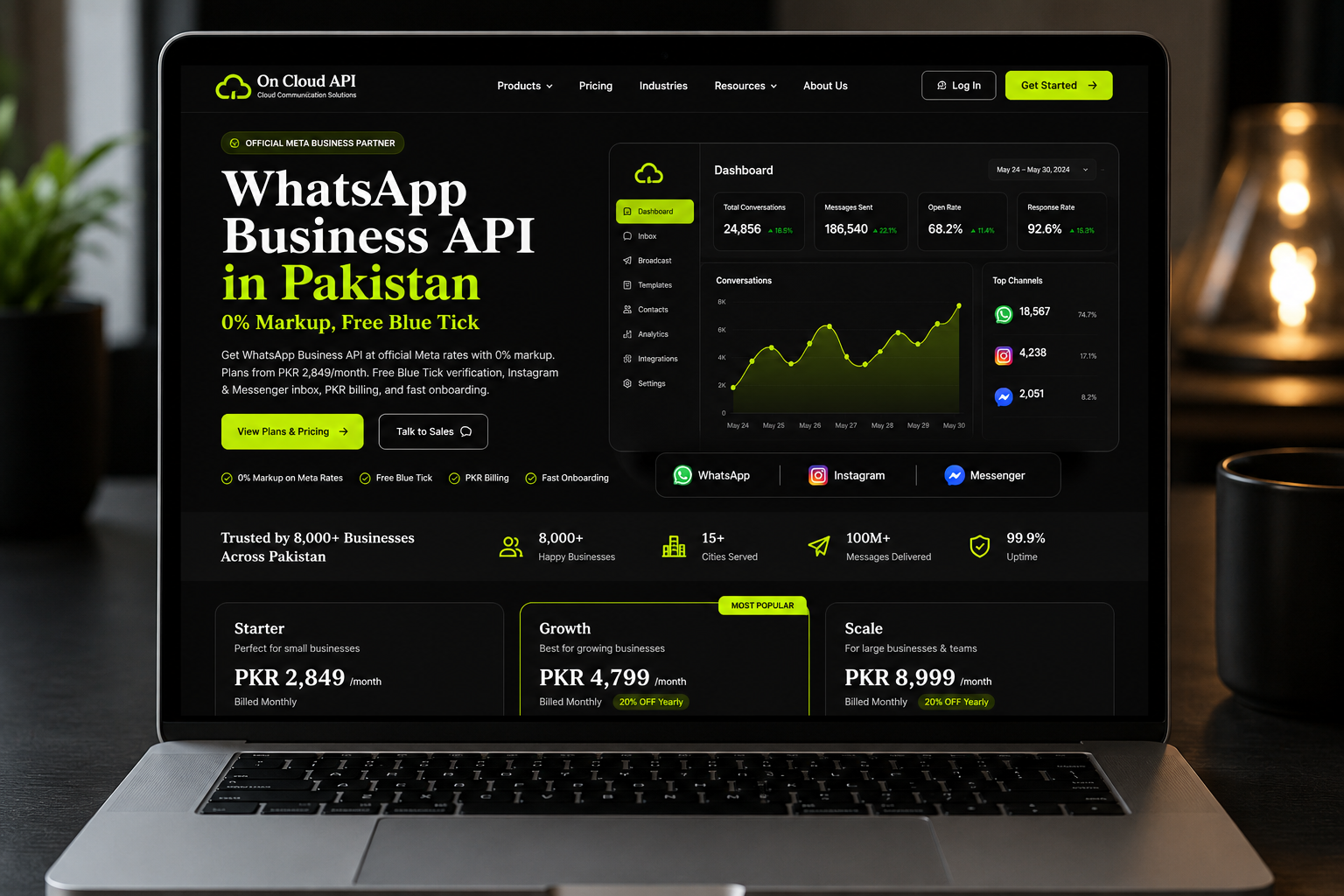
Meta Verified Tech Provider · Pakistan 2026
WhatsApp Business API in Pakistan — 0% Markup, Free Blue Tick
Agar aap Pakistan mein WhatsApp Business API dhoond rahay hain, to pehla sawal yehi hota hai: per-message rate par kitna markup lag raha hai? Yeh guide ek jagah batati hai ke API kya hai, 1 October 2026 ke baad Meta ke rates kya hain, kaun se documents chahiye, approval kaise hota hai, blue tick ka asal matlab kya hai, aur provider kaise chunna hai. Sab seedhi zubaan mein, hidden charges ke bina.
By On Cloud API team · Updated
- Quick answer
- Key takeaways
- Key facts at a glance
- What is the WhatsApp Business API?
- Business App vs Business API
- Cloud API vs a provider
- Official API vs unofficial tools
- What does it cost in Pakistan?
- Meta rates from 1 October 2026
- What 0% markup means
- Free or cheap API?
- Documents and requirements
- Setup and approval steps
- Messaging limits and quality rating
- Templates and approval
- Urdu and Roman Urdu
- Blue tick explained
- What you can do with it
- Bulk messages and campaigns
- Developers: token and webhook
- Industries
- Cities
- How to choose a provider
- Avoiding bans
- Existing number and switching
- Common problems
- Roman Urdu mein short jawab
- Where On Cloud API fits
- FAQs
Quick answer: what is the WhatsApp Business API in Pakistan?
The WhatsApp Business API is Meta's official platform for sending and receiving WhatsApp messages at scale. In Pakistan you reach it through an approved provider. With On Cloud API you pay a monthly plan from $9.99 plus Meta's per-message rate at 0% markup, and you need business documents, a website and a number not active on the WhatsApp app.
There is no separate app to download. The API is the engine, and your provider gives you the screen: an inbox, campaigns, chatbots and integrations. Most Pakistani businesses get live in a few working days once the documents are ready.
Key takeaways
- Two costs, not one. A provider plan, plus Meta's per-message rate set by message type and recipient country.
- 0% markup means no commission on Meta's rate. What Meta charges is what you pay for messages.
- Rates changed today. From 1 October 2026 Pakistan utility and authentication messages cost $0.0150, up from $0.0100, and service messages are billed after 1,000 free a month.
- Marketing stays at $0.0473 per delivered message in Pakistan.
- The blue tick is optional and never guaranteed. You do not need it to send messages.
- Your number must be free. A number already active on the WhatsApp app has to be handled first, or use Coexistence.
Key facts at a glance (as of 1 October 2026)
| Question | Answer |
|---|---|
| What is it? | Meta's official WhatsApp Business Platform, also called the WhatsApp Business API or Cloud API |
| Who gives access? | Approved providers, such as On Cloud API, a Meta Verified Tech Provider |
| On Cloud API plans | From $9.99 a month (about PKR 2,800 at PKR 280 per USD) |
| Markup on Meta rates | 0% |
| Pakistan marketing rate | $0.0473 per delivered message |
| Pakistan utility and authentication | $0.0150 from 1 October 2026 (was $0.0100) |
| Service messages | First 1,000 a month free per business number, then billed |
| Documents | SECP certificate or FBR NTN, utility bill or bank statement, matching website or social page |
| Verification time | Usually 24 to 48 hours, decided by Meta |
| Pay in PKR | JazzCash, Easypaisa, Raast or bank transfer |
What is the WhatsApp Business API, and how does it work?
The WhatsApp Business API, officially the WhatsApp Business Platform, connects your business number to software instead of a phone. That lets several agents share one number, send approved templates at scale and plug WhatsApp into your website, CRM or store. Meta charges per delivered message, and a provider adds the dashboard.
Think of it this way. The WhatsApp Business App is a shop counter with one person behind it. The API is the whole back office: a team inbox, automatic replies, order alerts, reminders and reports, all working on the same number your customers already know.
WhatsApp Business App vs WhatsApp Business API: which one do you need?
Use the free WhatsApp Business App if one or two people answer a small number of chats from a phone. Move to the API when you need several agents on one number, approved bulk campaigns, chatbots, CRM records, reports or order alerts. The API has a provider plan plus Meta's per-message charges.
| Question | Business App | Business API |
|---|---|---|
| Best for | Small shops, single-person teams | Growing teams, agencies, enterprises |
| Interface | Phone app | Provider dashboard or your own system |
| Team access | Very limited | Shared inbox with assignment and roles |
| Bulk messages | Manual broadcast lists | Approved templates, segments, scheduling |
| Automation | Quick replies | Chatbots, AI, CRM, webhooks, REST API |
| Cost | Free to use | Provider plan plus Meta per-message rates |
You do not always have to choose. With Coexistence, one number can stay on the Business App and run on the API at the same time. We explain how it works in our WhatsApp Cloud API guide.
What is the difference between the WhatsApp Cloud API and a provider?
The Cloud API is Meta's hosted technology. A provider is the company that gives you a working product on top of it, with an inbox, campaigns, chatbots and support. A developer can connect to the Cloud API directly, but most businesses choose a provider because they want to use WhatsApp, not build it.
Going direct means your developer builds the inbox, the template manager, the webhook handling and the reports. That suits product companies with an engineering team. For a school, clinic, online store or agency, a provider is usually faster and cheaper than building and maintaining all that. Developers still get a REST API and webhooks on top of On Cloud API, so nothing is locked away.
Official WhatsApp API or unofficial tools: what is the difference?
The official WhatsApp API comes from Meta through an approved provider, with business verification, approved templates and opt-in rules. Unofficial tools usually link an ordinary number by scanning a QR code and send bulk messages outside Meta's rules. They can look cheaper, but the number can be banned and there is no official support.
Before you buy, run a quick check on any provider:
- Does it say it is a Meta Tech Provider or Business Partner, and can you verify that?
- Does setup ask for Meta Business Verification and your business documents? Real access always does.
- Are messages charged at Meta's rates per delivered message, with the rate sheet visible?
- Does it ask you to scan a QR code with a personal WhatsApp? That is the usual sign of an unofficial tool.
The safe route is also the one that lasts. Official access gives you approved templates, quality ratings, Meta's own reporting and a number that stays yours. Our guide on safe WhatsApp automation explains the difference in more detail.
How much does the WhatsApp Business API cost in Pakistan?
You pay two things: a provider plan and Meta's per-message rates. On Cloud API plans run from $9.99 a month on Standard to $39.99 on Enterprises, with no markup on Meta's message rates. Yearly billing takes 20% off and quarterly takes 10% off. Platform messages are unlimited, so your real variable cost is Meta's fee.
| Plan | Price per month | Setup fee | Contacts | Agents |
|---|---|---|---|---|
| Standard | $9.99 | $18 | 5,000 | 5 |
| Growth | $19.99 | $15 | 25,000 | 10 |
| Scale | $29.99 | $10 | Unlimited | 15 |
| Enterprises | $39.99 | $5 | Unlimited | 20 |
Every plan includes the shared inbox, contacts, templates, bulk campaigns, QR codes, chatbots and the agents system. Extras such as the RAG AI agent, Flow Builder, sales pipeline and the Instagram and Messenger inbox are add-ons. PKR amounts depend on the exchange rate, so the dollar price on the pricing page is the one to trust. For a deeper breakdown read what you will actually pay after 1 October 2026.
What are Meta's WhatsApp rates in Pakistan from 1 October 2026?
In Pakistan, marketing messages stay at $0.0473. Utility and authentication messages rise from $0.0100 to $0.0150 on 1 October 2026. Service messages are billed after the first 1,000 free per business number each month, and utility messages sent inside an open 24-hour window also become billable.
| Category | Typical use | Until 30 Sep 2026 | From 1 Oct 2026 |
|---|---|---|---|
| Marketing | Offers, promotions, campaigns | $0.0473 | $0.0473, no change |
| Utility | Order updates, receipts, appointment reminders | $0.0100 | $0.0150, also billed inside an open 24-hour window |
| Authentication | OTP and login codes | $0.0100 | $0.0150 |
| Service | Replies to customer-started chats | Free | First 1,000 a month per business number free, then $0.0150 |
Meta bills per delivered message, by category and recipient country, and it may change rates only on 1 January, 1 April, 1 July and 1 October. The structure comes from Meta's pricing updates page. The $0.0150 Pakistan figure is also reported by ProPakistani, so confirm it on Meta's own rate card before you plan a large campaign.
5,000 marketing messages × $0.0473 = $236.50. 3,000 utility messages × $0.0150 = $45.00. 2,000 OTP messages × $0.0150 = $30.00. Total about $311.50, roughly PKR 87,000 at PKR 280 per USD, plus your plan fee. A provider that adds a markup would bill more for the same volume.
What does 0% markup actually mean?
Zero markup means the provider adds no commission on Meta's per-message rate. If Meta charges $0.0473 for a marketing message to Pakistan, you pay $0.0473. The provider earns from its monthly plan instead. Always ask any provider for its full rate sheet so you can compare the per-message price, not just the plan fee.
| What to compare | A provider with markup | On Cloud API |
|---|---|---|
| Per-message rate | Meta's rate plus a commission | Meta's exact rate |
| Plan fee | Varies widely, check each rate sheet | From $9.99 a month |
| Discounts | Varies | 10% quarterly, 20% yearly |
| Status with Meta | Varies | Meta Verified Tech Provider |
| Payment in Pakistan | Often international card | JazzCash, Easypaisa, Raast, bank transfer |
Want a wider market view first? Our provider comparison for Pakistan lists what to check.
Is there a free or cheap WhatsApp Business API in Pakistan?
Meta does not give the API away free. You pay a provider plan plus per-message fees, though service replies are free up to 1,000 a month per business number from 1 October 2026. The free WhatsApp Business App is a different product. A low cost comes from zero markup and a plan that fits your team.
"Free" usually means one of three things, and it helps to know which one you are being offered:
- The free Business App. Free to use, but limited to a phone and a few linked devices.
- Free message windows. Meta makes some messages free, such as service replies up to the monthly allowance and the entry point window after a Click-to-WhatsApp ad.
- A provider trial or offer. Some providers run one. Check the current offer on the pricing page instead of trusting an old screenshot.
For a small team on a tight budget, the Standard plan at $9.99 a month plus Meta's message fees is the realistic "cheap" route. See pay-as-you-go billing for Pakistani SMEs for how that plays out month to month.
What documents do you need for the WhatsApp Business API in Pakistan?
You need a legal business proof such as an SECP certificate or FBR NTN, a recent utility bill or bank statement showing the business name, and a website or social page that matches it. You also need a phone number that is not active on the WhatsApp app. Meta then reviews these for Business Verification.
- Business proof: SECP certificate, or FBR NTN for sole proprietors.
- Address or account proof: a utility bill or bank statement with the business name.
- Matching online presence: a website or social page using the same name and details.
- A suitable number: one not active on the WhatsApp app, unless you use Coexistence.
- Meta Business Manager access for the person who will verify the business.
Mismatched names are the most common reason verification stalls. Use the exact same business name on the certificate, the website and the Meta profile.
How do you set up the WhatsApp Business API in Pakistan, step by step?
Choose a provider, submit your business details and documents, complete Meta Business Verification, connect your number, get your display name and message templates approved, then connect your inbox, chatbot or CRM and go live. Verification is usually decided in 24 to 48 hours, but Meta controls the timing.
- Pick a provider and plan. Sign up and choose the plan that fits your team size.
- Submit business details. SECP or NTN, address proof and your website.
- Business Verification. Meta reviews the company in Business Manager.
- Connect the number. Verify it with a code and get the display name approved.
- Templates. Submit message templates for Meta approval, for example order updates or OTP.
- Go live. Connect the inbox, chatbot, website, store or CRM and start with a small test group.
Meta decides every approval, so no provider can promise an exact time. On Cloud API prepares and submits the applications with you. If your number is already on the WhatsApp app, see our note on why onboarding still matters.
What are WhatsApp messaging limits and quality ratings?
Messaging limits cap how many different customers you can start conversations with in a day. New numbers start low and move up through tiers of 250, 2,000, 10,000, 100,000 and unlimited as your volume and quality rating stay healthy. Replies to customers who message you first are handled separately. Check Meta's current rules.
The quality rating is Meta's score of how customers react to your messages. Many blocks and reports push it down, and a low rating can stop your limit from rising or get a number restricted. Good opt-in, relevant templates and a sensible sending pace keep it healthy. Our guide to protecting your quality rating covers the details.
How do WhatsApp message templates work, and how long does approval take?
A template is a pre-approved message you use to start a chat, or to message someone outside the 24-hour customer service window. You choose a category (marketing, utility or authentication), submit it in your dashboard and Meta reviews it, often within minutes to a day. Clear wording, the right category and consent reduce rejections.
| Template type | Example |
|---|---|
| Marketing | Eid sale, new arrival, discount code |
| Utility | Order confirmation, delivery update, payment receipt, appointment reminder |
| Authentication | One-time password for login or signup |
Inside the 24-hour window after a customer writes to you, you can reply with normal free-form messages. Outside it, you need an approved template. If Meta rejects one, the usual fixes are to remove promotional wording from a utility template, pick the correct category, and avoid vague or misleading text.
Can you use WhatsApp templates and chatbots in Urdu or Roman Urdu?
Yes. You can write templates in Urdu, and a chatbot or AI agent can reply in English, Urdu or Roman Urdu depending on how it is built. Customers in Pakistan often type Roman Urdu, so plan for it. Always keep an easy route to a human agent for anything the bot cannot handle.
Two practical tips. First, write the same template in both English and Urdu if your audience is mixed. Second, test your chatbot with real Roman Urdu spellings, because "kitne ka hai", "price kya hai" and "rate btao" all mean the same thing. On Cloud API includes chatbots on every plan, and the AI agent and Flow Builder are add-ons.
Is the WhatsApp green tick now the blue tick, and can you get it?
Yes. Meta changed the WhatsApp verified badge from green to blue in 2024. On the API, the Official Business Account badge has no Meta fee but needs Business Verification, an approved display name, two-step verification and genuine public recognition. Approval is Meta's decision, and no provider can issue one or guarantee it.
Three different things share the word "tick", and mixing them up is how people get scammed:
- Read receipts. The grey and blue ticks under a chat message. Nothing to do with verification.
- Official Business Account badge. For API accounts. Free from Meta, but only for notable brands.
- Meta Verified. A paid subscription, mainly for the free Business App.
What can a Pakistani business do with the WhatsApp Business API?
You can run a shared team inbox, send approved bulk campaigns, automate replies with chatbots in English, Urdu or Roman Urdu, send OTPs, order updates and payment alerts, and connect Shopify, WooCommerce, Google Sheets, Zapier or your own system through a REST API and webhooks.
- Shared inbox. Multiple team members on one WhatsApp number, with each chat assigned to one owner. See one number, one team.
- Bulk campaigns and templates. Eid, Ramadan and sale messages to segmented contacts who have opted in.
- Chatbots and AI. Replies in English, Urdu or Roman Urdu, at any hour. The AI agent and Flow Builder are add-ons.
- OTP and alerts. Login codes, payment confirmations, delivery updates and appointment reminders. Compare WhatsApp OTP and SMS OTP.
- CRM and lead follow-up. Capture, qualify and assign leads. See WhatsApp CRM in Pakistan.
- Integrations. Shopify, WooCommerce, Google Sheets, Zapier, REST API and webhooks. For builders, see n8n workflows you can build.
How do official bulk messages and broadcasts work in Pakistan?
Official bulk messaging means sending an approved marketing template to contacts who agreed to hear from you, at a pace your messaging limit allows. You segment the list, schedule the campaign and read delivery reports. It costs Meta's marketing rate per delivered message, so targeting matters more than volume.
- Get consent first. Checkout tickboxes, QR codes, website forms and "reply YES" messages all work.
- Segment by city, interest and last purchase. Eid, Ramadan and salary-week offers land better when they are relevant.
- Schedule and measure. Track delivered, read and replied, and stop sending to people who do not respond.
- Compare with SMS. WhatsApp allows buttons, images and replies, and customers can answer in the same thread.
Ads can start conversations too. A customer who messages you from a Facebook or Instagram ad may open a free entry point window under Meta's current rules, so check the live terms before you plan around it.
What do developers need: access token, webhook and integrations?
A developer needs an access token to send messages, a phone number ID, and a webhook URL that receives incoming messages, delivery status and errors. Through a provider you also get a REST API and ready integrations with Shopify, WooCommerce, Google Sheets, Zapier and n8n, so you do not have to build everything from scratch.
The webhook is the part that trips most people up. It must be reachable over HTTPS, answer Meta's verification request, and respond quickly. Test with a small number first, log every payload, and handle status updates as well as messages. If you would rather build on workflows than code, see 15 n8n workflows you can actually build.
Which industries use the WhatsApp Business API in Pakistan?
E-commerce, real estate, schools and coaching institutes, clinics and pharmacies, banks and finance, restaurants, travel agencies, car dealers, salons, gyms and marketing agencies all use it. The common thread is repeat conversations: orders, appointments, fees, enquiries and reminders that are slow by phone call.
Order confirmations, delivery updates, abandoned cart reminders, COD confirmation and Shopify or WooCommerce integration. E-commerce page, or COD verification.
Property enquiries, brochures, site visit bookings and lead qualification. Real estate page.
Admission follow-up, fee reminders and course material. Schools and universities.
Clinic appointment booking, reminders and lab report delivery. Healthcare page.
Transaction alerts, OTP and support at scale. Banking page.
Many client accounts from one dashboard. See the reseller and white-label program.
Other sectors follow the same pattern. Logistics and couriers use delivery tracking, failed-delivery and COD confirmation messages. Fintech and lenders send transaction alerts, EMI reminders and KYC notices. Restaurants take table bookings and order alerts. Salons and gyms send appointment, class and membership reminders. Car dealers and garages use test-drive bookings, service reminders and job-card updates. Clinics send appointment, prescription-refill and lab-report messages. See our travel agency playbook for one example.
Is the WhatsApp Business API available in every Pakistani city?
Yes. Setup and support are fully remote, so businesses in Karachi, Lahore, Islamabad, Rawalpindi, Faisalabad, Multan, Peshawar, Quetta, Sialkot, Gujranwala and smaller cities can all be onboarded. Support is available in Urdu and English, so you do not need a local office.
We onboard businesses in Karachi, Lahore, Islamabad, Rawalpindi, Faisalabad, Multan, Peshawar, Quetta, Sialkot, Gujranwala, Hyderabad, Bahawalpur, Sargodha, Sheikhupura, Abbottabad, Sukkur, Larkana, Mardan, Rahim Yar Khan, Gujrat and Sahiwal. Buyers who search for a local provider or "near me" mostly want Urdu support and a team in their time zone, and that does not depend on an office in your city. City-wise detail is on the Pakistan cities page.
How do you choose a WhatsApp Business API provider in Pakistan?
Check that the provider is approved by Meta, shows its full per-message rate sheet, accepts PKR payment, offers Urdu support, and clearly lists which features are included and which are add-ons. Avoid anyone who guarantees a blue tick or promises that your number can never be restricted.
- Is it a Meta Verified Tech Provider, and will it say so publicly?
- Is the markup on Meta's rate 0%, or is it hidden inside the price?
- Can you pay locally, without an international card?
- Who do you talk to when something breaks, and in which language?
- Are the AI agent, flows and extra channels included or sold separately?
Can a WhatsApp Business API number get banned?
Any WhatsApp number can be restricted if it breaks Meta's policies, for example by messaging people who never opted in, sending spam or getting heavy blocks. Good opt-in records, relevant templates and slow, steady sending lower the risk, but no provider can promise an account will never be restricted.
Start small, message only people who expect to hear from you, and watch your quality rating. Our guides on protecting your quality rating and using automation safely go step by step. Also read the WhatsApp Business Messaging Policy.
Can I keep my existing number or switch provider later?
Usually yes. A number that is active on the WhatsApp app must be handled before it joins the API, unless you use Coexistence, which lets the same number run on the Business App and the API together. You can also move a number between providers, but ask first about template and account ownership transfer and any downtime.
Coexistence is included on every On Cloud API plan at no extra charge. Before any move, back up your chats and contacts, list your approved templates, and pick a quiet hour for the switch. Who owns the WhatsApp Business Account matters most: it should be yours, not the provider's.
What are the most common problems, and how do you fix them?
The usual issues are a rejected template, a verification that stalls, a message that does not deliver, and a payment error on the account. Most come from mismatched business details, the wrong template category, a missing opt-in, or no valid payment method on the WhatsApp Business Account.
- Verification stalls: make the name on your certificate, website and Meta profile identical.
- Template rejected: fix the category, remove promotion from utility text, resubmit.
- Message not delivered: the customer may not be on WhatsApp, may have blocked you, or you may be outside the 24-hour window without a template.
- Error 131042: this Meta code points to a payment or eligibility problem on the account, so check the billing setup.
- Number restricted: stop sending, review opt-in and content, then appeal, and start with the ban-prevention guides linked above.
Roman Urdu mein short jawab
Pakistan mein WhatsApp Business API kaise milta hai?
Kisi approved provider se. Aap plan lete hain, documents dete hain, Meta Business Verification hoti hai, number connect hota hai aur templates approve hote hain. Phir aap inbox, chatbot ya CRM se kaam shuru karte hain.
Requirements kya hain?
SECP certificate ya NTN, utility bill ya bank statement, matching website ya social page, aur aisa number jo WhatsApp app mein active na ho. Coexistence use karein to same number dono jagah chal sakta hai.
Sasti WhatsApp API kahan se milegi?
Wahan jahan Meta ke rate par markup na ho aur plan aapki team ke size ke mutabiq ho. Sirf sabse kam plan fee dekh kar decide na karein, poori rate sheet maangein.
Provider change kaise karun?
Pehle poochein ke number, WhatsApp Business Account aur templates transfer honge ya nahi, aur kitna downtime hoga. Chats aur contacts ka backup pehle le lein.
Ban se kaise bachein?
Sirf opt-in logon ko message karein, sahi template category use karein, dheere dheere volume barhayein aur quality rating dekhte rahein.
Mere business ke liye best option kya hai?
Chhoti team aur kam chats ho to Business App kaafi hai. Jab multiple agents, campaigns, chatbot, CRM ya order alerts chahiye hon, to API aur aik provider behtar hai.
Where does On Cloud API fit?
On Cloud API is a Meta Verified Tech Provider built by Wolf Software Solutions. You get the official Cloud API with a shared inbox, contacts, templates, bulk campaigns, QR codes and chatbots from $9.99 a month, with 0% markup on Meta's message rates and payment in PKR.
If you want to see the full Pakistan offer, open the WhatsApp API Pakistan page, compare plans, or talk to the team.
Frequently asked questions
What is the WhatsApp Business API in Pakistan?
It is Meta's official platform for sending and receiving WhatsApp messages at scale, with several agents, automation and integrations. In Pakistan you access it through an approved provider such as On Cloud API, which adds a shared inbox, chatbots, campaigns and a REST API on top of Meta's Cloud API.
How much does the WhatsApp Business API cost in Pakistan?
On Cloud API plans run from $9.99 to $39.99 a month, with 10% off quarterly and 20% off yearly billing. On top you pay Meta's per-message rate at 0% markup. In Pakistan, marketing is $0.0473, and utility and authentication are $0.0150 from 1 October 2026. Confirm on Meta's rate card.
What changed in Meta's Pakistan pricing on 1 October 2026?
Utility and authentication messages rose from $0.0100 to $0.0150. Service messages are now billed after the first 1,000 free per business number each month, and utility templates inside an open 24-hour window are billable too. Marketing stays at $0.0473. Meta may change rates only on quarter starts.
Is the WhatsApp green tick now the blue tick?
Yes. Meta changed the verified badge from green to blue in 2024. The badge is optional and is not needed to send messages. On the API it is decided by Meta, based on verification, display name approval and real public recognition, so no provider can guarantee it.
What documents do I need for the WhatsApp Business API in Pakistan?
You need an SECP certificate or FBR NTN, a utility bill or bank statement with the business name, and a website or social page that matches. You also need a phone number not active on the WhatsApp app, unless you use Coexistence. Meta then runs Business Verification, usually decided in 24 to 48 hours.
Is the official WhatsApp Business API different from unofficial tools?
Yes. The official API comes from Meta through an approved provider, with business verification, approved templates and opt-in rules. Unofficial tools usually connect a normal number by QR code and ignore those rules, which risks a ban and leaves you without official support or reporting.
What is the difference between the WhatsApp Business App and the API?
The Business App is a free phone app for small teams. The API has no built-in screen. You use it through a provider's dashboard or your own system, which allows multiple agents on one number, chatbots, approved bulk campaigns, CRM integration and per-message billing from Meta.
Can I use a WhatsApp chatbot in Urdu or Roman Urdu?
Yes. A chatbot or AI agent can reply in English, Urdu or Roman Urdu depending on how you build it. On Cloud API includes chatbots on every plan, while the RAG AI agent and Flow Builder are add-ons. Always add an easy way to reach a human.
Can my WhatsApp Business API number get banned?
Any number can be restricted if it breaks Meta's policies, for example by messaging people who have not opted in or sending spam. On Cloud API is a Meta Verified Tech Provider and builds around those policies, but no provider can guarantee a number will never be restricted.
Is there a free WhatsApp Business API in Pakistan?
Meta does not give the API away free. You pay a provider plan plus Meta's per-message fees, although service replies are free up to 1,000 a month per business number from 1 October 2026. The free WhatsApp Business App is a separate product with fewer features.
The short version
Get the documents ready, choose a provider that shows its rate sheet, expect Meta's per-message charges on top of the plan, and treat the blue tick as a bonus, not a requirement. The 1 October 2026 changes make utility and OTP messages a little dearer, so plan your volume before you launch. Start small, stay opted-in, and scale once replies are healthy.